تخمین سن از روی چهره
Estimate Age from Face
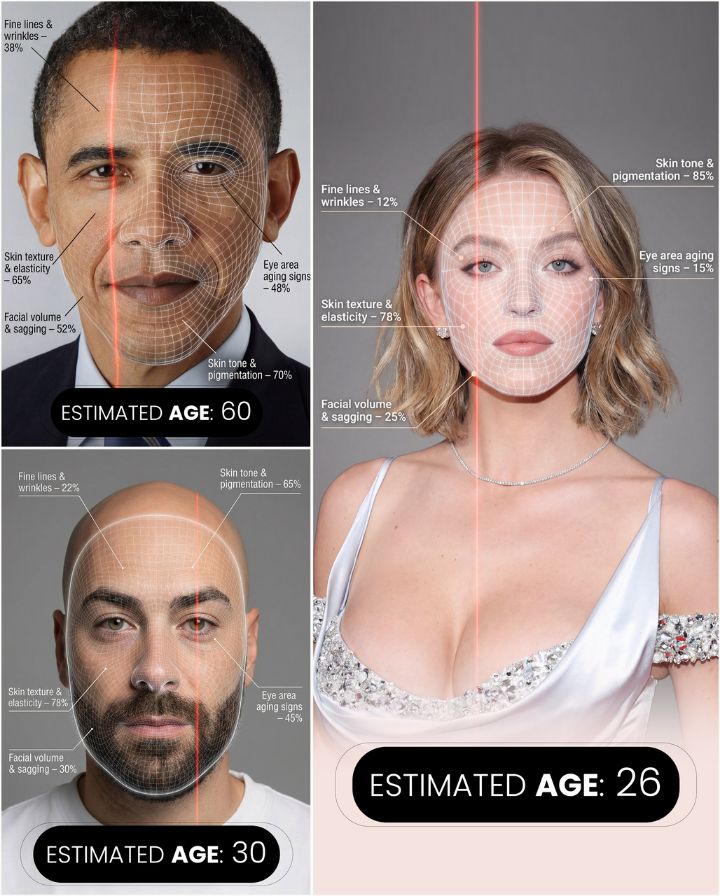
پرامپت تصویری «تخمین سن از روی چهره» که روی عکس خودت کار میکند: عکس را به Gemini یا ChatGPT بده، این متن را بفرست و نتیجهای شبیه نمونهی همین صفحه بگیر.
قبل از پرامپت: اول یک عکس مرجع آپلود کن.
متن پرامپت
Create a hyper-realistic, high-resolution portrait infographic based on (your photo). Keep the identity, hairstyle, clothing, and natural skin tone of the person in (your photo) unchanged, and use a neutral studio background. Overlay a subtle semi-transparent facial analysis grid on the entire face, similar to a 3D facial scan grid: fine, soft white lines extending along the facial contours, slightly glossy but not obscuring skin details. Add a clear vertical red laser line on one side of the face, like a futuristic scanning effect. All analysis lines must be soft, concise, and elegant, like a beauty technology advertisement. Create a concise medical beauty infographic using global data percentages to evaluate 5 aging factors: 1. Fine lines and wrinkles; 2. Skin texture and elasticity; 3. Facial volume and sagging; 4. Signs of aging around eyes; 5. Skin tone and pigmentation: For each factor, place a small label with a thin line pointing to the corresponding facial area, and write a short title and a 0-100% actual percentage score (based on global data) next to it, for example: "Fine lines and wrinkles - 18%" "Skin texture and elasticity - 72%" "Facial volume and sagging - 35%" "Signs of aging around eyes - 41%" "Skin tone and pigmentation - 63%". Use concise, modern sans-serif fonts and small technical style text, similar to scientific facial analysis user interface. In the bottom center of the image, display the estimated real age based on the analysis in bold large characters, for example: "Estimated Age: (random number based on facial analysis)". Overall style: Futuristic AI-guided skincare analysis, minimalist, high-end editorial lighting, gender-neutral, suitable for any face.
چطور از این پرامپت استفاده کنم؟
این یک پرامپت تصویری است: خروجیاش عکس است، نه متن. عکس بالای صفحه نمونهای است که همین متن ساخته.
۱) ابزار تصویرساز را باز کن. بهترین نتیجه را Gemini با مدل Nano Banana میدهد؛ ChatGPT (ساخت تصویر) هم خوب جواب میدهد. Claude تصویر نمیسازد.
۲) اول عکس را آپلود کن. اول یک عکس مرجع آپلود کن. بدون عکس ورودی، مدل چیزی برای تبدیل ندارد و از خودش تصویر میسازد.
۳) پرامپت را همانطور که هست بچسبان و بفرست. متن انگلیسی را ترجمه نکن؛ مدلهای تصویری با انگلیسی دقیقتر کار میکنند. برای شخصیسازی فقط کلمههای موضوع، رنگ یا متن روی تصویر را عوض کن.
۴) با یک جمله اصلاح کن. لازم نیست همهچیز را از اول بفرستی؛ بنویس «پسزمینه را سادهتر کن»، «نور را گرمتر کن» یا «همین را عمودی بساز».
۵) اگر دور بود، دوباره بساز. هر اجرا کمی فرق میکند. دو سه بار ساختن و انتخاب بهترین، معمولاً از بازنویسی پرامپت سریعتر است.
نمونه استفاده واقعی
چه خروجیای باید بگیری
نکتههای حرفهای
- نوشتهی فارسی روی تصویر هنوز نقطهضعف مدلهای تصویری است و حروف را بههم میریزد. متن را انگلیسی بنویس یا بعداً در ویرایشگر اضافه کن.
- برای اینکه چهره عوض نشود، آخر پرامپت اضافه کن: keep the face exactly the same as the uploaded photo.
- نسبت تصویر را آخر پرامپت بگو: vertical 9:16 برای استوری، square 1:1 برای پست، 16:9 برای بنر.