قفسهی نمایش محصولات شخصیت
Merchandise Display Shelf
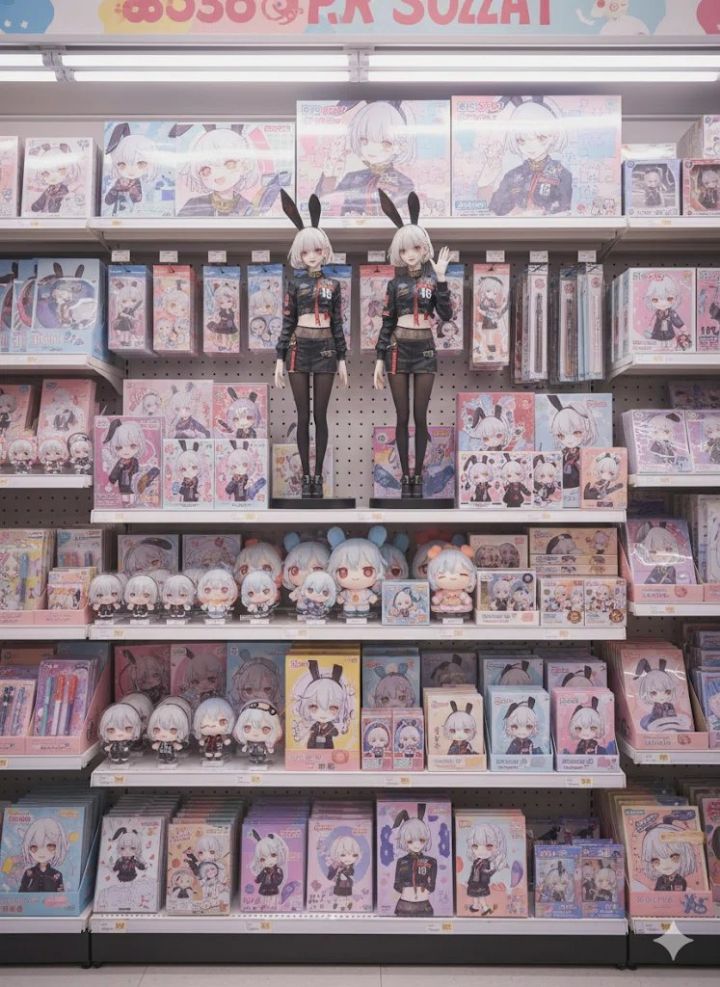
پرامپت تصویری «قفسهی نمایش محصولات شخصیت» که روی عکس خودت کار میکند: عکس را به Gemini یا ChatGPT بده، این متن را بفرست و نتیجهای شبیه نمونهی همین صفحه بگیر.
قبل از پرامپت: اول یک عکس مرجع آپلود کن.
متن پرامپت
Remove the background from this illustration and turn it into merchandise like figurines.
Image: Photorealistic
Location:
The shelves of a fictional convenience store that doesn't exist in Japan. The cute, pop atmosphere is complemented by neatly arranged merchandise featuring the illustration. The store's interior is dreamily bright and special, creating a special space that excites fans.

Characters:
These merchandise are displayed on the shelves.

Merchandise Lineup:
Two large, approximately 50cm-long figures in the center of the screen (for a striking display)
Acrylic stands (deformed versions of the original artwork)

Chibi figures (deformed versions of the original artwork)

Dakimakura pillows (large prints for a striking presence)

Jigsaw puzzles (visual art of the characters)

Stationery (notebooks, pens, clear files, etc., deformed versions of the original artwork)

Cardboards (deformed versions of the original artwork)

Plush toys (deformed versions of the original artwork)

Display:
The merchandise are neatly arranged on the shelves, maintaining the atmosphere of a convenience store while still filling the space with love for the characters. They're arranged in a way that teenage female fans can't help but want to pick them up.

Overall tone:
A dreamlike merchandise sales space. Cuteness and pop are at the forefront, and despite being a convenience store, it's presented as a "holy land for fan activities."
Resolution: 4K, 4000px: 3000px
چطور از این پرامپت استفاده کنم؟
این یک پرامپت تصویری است: خروجیاش عکس است، نه متن. عکس بالای صفحه نمونهای است که همین متن ساخته.
۱) ابزار تصویرساز را باز کن. بهترین نتیجه را Gemini با مدل Nano Banana میدهد؛ ChatGPT (ساخت تصویر) هم خوب جواب میدهد. Claude تصویر نمیسازد.
۲) اول عکس را آپلود کن. اول یک عکس مرجع آپلود کن. بدون عکس ورودی، مدل چیزی برای تبدیل ندارد و از خودش تصویر میسازد.
۳) پرامپت را همانطور که هست بچسبان و بفرست. متن انگلیسی را ترجمه نکن؛ مدلهای تصویری با انگلیسی دقیقتر کار میکنند. برای شخصیسازی فقط کلمههای موضوع، رنگ یا متن روی تصویر را عوض کن.
۴) با یک جمله اصلاح کن. لازم نیست همهچیز را از اول بفرستی؛ بنویس «پسزمینه را سادهتر کن»، «نور را گرمتر کن» یا «همین را عمودی بساز».
۵) اگر دور بود، دوباره بساز. هر اجرا کمی فرق میکند. دو سه بار ساختن و انتخاب بهترین، معمولاً از بازنویسی پرامپت سریعتر است.
نمونه استفاده واقعی
چه خروجیای باید بگیری
نکتههای حرفهای
- نوشتهی فارسی روی تصویر هنوز نقطهضعف مدلهای تصویری است و حروف را بههم میریزد. متن را انگلیسی بنویس یا بعداً در ویرایشگر اضافه کن.
- برای اینکه چهره عوض نشود، آخر پرامپت اضافه کن: keep the face exactly the same as the uploaded photo.
- نسبت تصویر را آخر پرامپت بگو: vertical 9:16 برای استوری، square 1:1 برای پست، 16:9 برای بنر.